
Service 01
AI business automation for the work nobody has time for
Leads get logged, customers get an answer and follow-ups go out on schedule, without someone having to remember.

The problem
What this solves
Most small teams lose hours every week copying details between tools, chasing replies and sending the same reminder for the tenth time. None of it is hard. It just never stops, and when someone is out sick it quietly does not happen.
The benefit
Give your team back the hours that go into copying, chasing and reminding.
- New inquiries acknowledged within minutes, including nights and weekends
- One accurate customer record instead of three partial ones
- Follow-ups that go out on time, with a person approving anything sensitive
Who benefits
Who this is for
- Service businesses that live on enquiries, quotes and appointments
- Offices where the same details are typed into three different tools
- Owners who are the only person who remembers to follow up
Not sure it fits? Ask my AI assistant or book a call(opens in a new tab).
Use cases
Where this helps day to day
Lead capture automation
Every form, call and message lands in one place, tagged by source.
Automated lead qualification
New inquiries are sorted by service, urgency and fit before you read them.
CRM updates
Contact records are created and updated without retyping.
Email automation
Confirmations, quotes and check-ins sent from your own address.
Customer follow-up workflows
Open quotes and quiet leads get a timely, polite nudge.
Appointment reminders
Text and email reminders that cut down on no-shows.
Form processing
Intake forms turned into structured records and next steps.
Document processing
Key details pulled from invoices, applications and PDFs for review.
Administrative workflows
Onboarding checklists, approvals and handoffs that move by themselves.
Application integrations
Your calendar, inbox, CRM and accounting tool sharing the same facts.
Automated reporting
A weekly summary of what came in, what closed and what is stuck.
Task management workflows
The right person gets the right task with the context attached.
Try it yourself
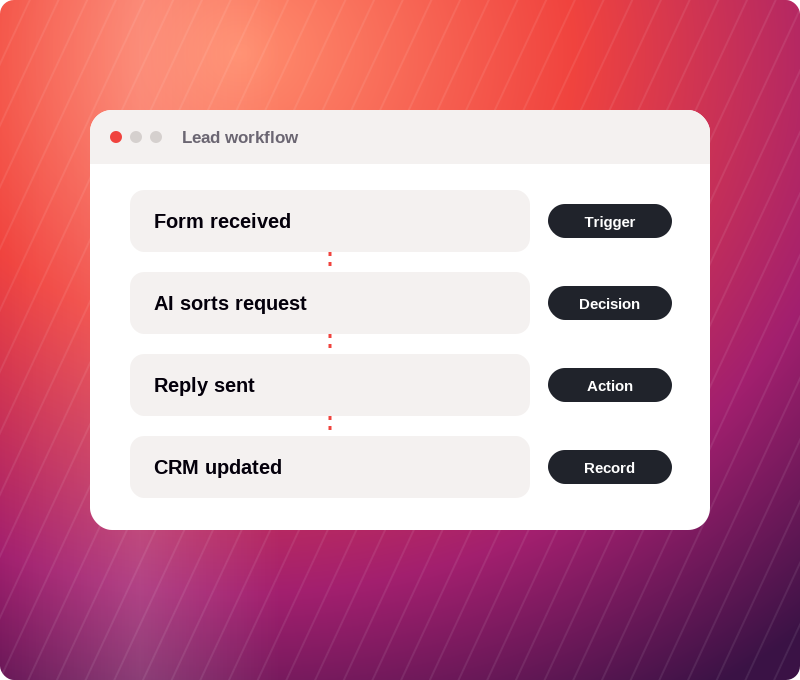
Follow one website lead through an automated workflow
Step through what happens after a visitor fills in a quote form. Each stage shows what the system does and what your team sees.
Implementation
What setting it up involves
Step 1
Map one workflow end to end, including who approves what
Step 2
Connect the tools involved and build the automation in stages
Step 3
Test with real examples and add alerts for anything that fails
Step 4
Hand over with a short guide so your team can pause or edit it
Deliverables
What you receive
- A plain-English map of every workflow and what triggers it
- Automations built in tools you already pay for wherever possible
- A short handover video and a written guide for your team
- A 30-day check-in to tune anything that misfires
After launch
Once it is live
Automations need looking after. I watch error alerts through the first month, fix what breaks and show your team how to pause or edit a workflow without calling me.
Straight answers
What it can and cannot do
It can
- Move information between the tools you use
- Send routine messages and reminders on schedule
- Sort and route new enquiries for a person to review
It cannot
- Make judgement calls that need a person
- Fix a process nobody agrees on yet
- Guarantee every connected app will allow full automation
Questions
Business Automation, answered plainly
Have a question that is not here? Ask my AI assistant, which can also pass your details to me.
Related services:
What can a small business automate with AI?
The best candidates are tasks that repeat, follow rules and involve moving information: logging leads, sending acknowledgments, updating a CRM, reminding customers, preparing weekly reports. Work that needs judgment stays with a person, with AI preparing a draft.
Will automation replace my staff?
That is not the goal and rarely the result. The usual outcome is that your team spends less time on data entry and more on customers. Every workflow I build has a clear point where a person can review, approve or step in.
Which tools do you work with?
I work with widely used CRMs, calendars, form builders, email platforms and automation tools. Tool choice follows your workflow and budget, and I confirm what each product supports before recommending it.
Next step
Talk through business automation for your business
Tell me a little about how you work today. I will reply with honest thoughts on whether this service is the right place to start.
- A 30-minute video call, no charge
- You talk to the consultant, not a sales team
- A written summary of ideas afterward, yours to keep