
Quick answer
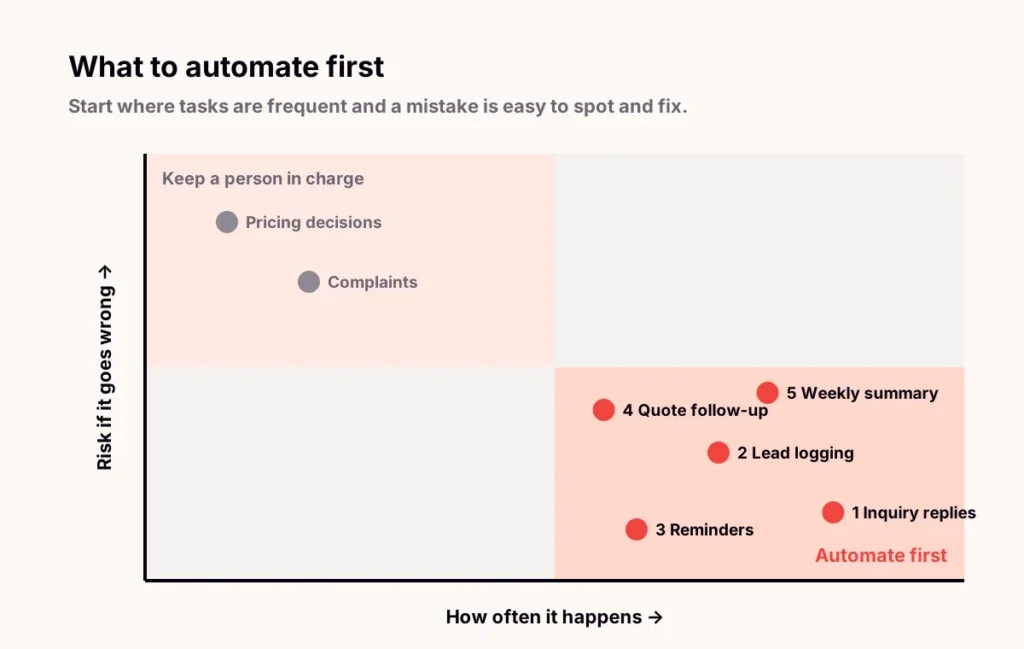
The first five tasks most small businesses should automate are acknowledging new inquiries, logging every lead in one place, sending appointment reminders, following up on open quotes and producing a weekly summary. They happen often, follow clear rules and are easy to check, so they save time quickly with little risk.
Key takeaways
- Start with tasks that are frequent, rule-based and easy to spot when they go wrong.
- Inquiry replies and lead logging come first because every later automation depends on them.
- Keep a person approving anything about pricing, complaints or sensitive information.
- Measure response time, no-shows and quotes followed up to see whether it is working.
How do you choose what to automate first?
Run each candidate task through three tests. The best first automations pass all three:
- Frequent. It happens daily or weekly, so the time saved adds up.
- Rule-based. You could explain it to a new hire in a few sentences.
- Easy to check. If it goes wrong, you notice quickly and the fix is simple.

1. Acknowledge every new inquiry
When someone fills in a form or messages you, they should get a friendly reply within minutes that confirms you received it and says when to expect a call. This is simple to set up and often the single biggest improvement in customer experience.
You need: your website form or inbox connected to an email or text tool. Watch out for: replies that sound robotic. Write the message yourself and keep it short.
2. Log every lead in one place
Send every form, call and message to a single list or CRM, tagged with where it came from. You cannot follow up on what you cannot see, and every later automation depends on this list.
You need: a CRM or even a shared spreadsheet, plus connections from each lead source. Watch out for: duplicate contacts. Match on email or phone number.
3. Send appointment reminders
A reminder the day before and the morning of an appointment reduces no-shows and frees your team from confirmation calls. Include a simple way to reschedule so a cancellation becomes a new booking instead of an empty slot.
You need: a booking calendar that can send texts or emails. Watch out for: too many messages. Two reminders is usually enough.
4. Follow up on open quotes
A polite check-in three days after a quote goes out recovers work that would otherwise drift away. Keep a person in the loop for the wording, and stop the sequence as soon as the customer replies.
You need: quotes recorded with a status in your CRM. Watch out for: following up on quotes that were already accepted by phone. Update the status first.
5. Produce a weekly summary
A short Friday email covering leads received, jobs booked and quotes still open gives you a regular pulse without logging in to anything. It also shows quickly whether the first four automations are working.
You need: the lead list from step 2 and a reporting or dashboard tool. Watch out for: numbers nobody trusts. Agree what each figure means before automating it.
What should you not automate yet?
- Pricing decisions and discounts.
- Responses to complaints or upset customers.
- Anything involving health, financial or other sensitive information.
- Tasks that change every week and have no clear rules.
These can benefit from AI-drafted responses later, with a person approving every message, once the basics run reliably.
How do you know the automation is working?
| Automation | What to measure |
|---|---|
| Inquiry acknowledgment | Time from inquiry to first reply |
| Lead logging | Share of leads with a recorded source |
| Appointment reminders | No-show and late-cancellation rate |
| Quote follow-up | Share of quotes followed up within three days |
| Weekly summary | Whether you read it and act on it |
Want to see the first two steps in action? Step through a lead from form to follow-up in the automation workflow demo.
Frequently asked questions
What should a small business automate first?
Start with acknowledging new inquiries and logging every lead in one place. They are quick to set up, low risk and every later automation depends on them.
Do I need expensive software to automate these tasks?
Usually not. Many businesses already pay for tools that can do most of this, such as their email platform, booking calendar or CRM. The work is mostly in connecting them.
How long does it take to automate these five tasks?
Each one can often be set up within days. Doing them one at a time over a few weeks lets you test each before adding the next.
Will automation make my business feel impersonal?
Not if you write the messages yourself, keep them short and make it easy for customers to reach a person. Fast, friendly replies usually feel more personal than slow ones.
Related service
AI Business Automation
Leads get logged, customers get an answer and follow-ups go out on schedule, without someone having to remember.